GraphQL and DynamoDB can still be friends
November 16, 2020
share-linkServerless, GraphQL, and DynamoDB can be a powerful combination for building web apps. The first two get are well loved. But DynamoDB is often misunderstood or actively avoided. It is dismissed as only worth the effort “at scale”.
That was my assumption and I tried to stick with SQL databases for my serverless apps for a quite a while. After learning and using DynamoDB I see the benefits for projects of any scale.
To show you what I mean lets build an API from start to finish. Without any heavy ORM’s or GraphQL framework to hide what is really going on. Maybe when we are done you might consider giving DynamoDB a second look. I think it is worth the effort.
Main objection to GraphQL and DynamoDB
The main objection to DynamoDB is that it is hard to learn and use, but few people argue that it is not powerful. I agree the learning curve feels very steep. But SQL databases are not the best fit with serverless applications. Where do you stand up that database, and how you manage connections to it just don’t mesh with the serverless model as well. DyanamoDB is a more serverless friendly by design. You are trading the up front pain of learning something hard for the constant future pain of running hard, where the problems will only get harder if your application grows.
The case against using GraphQL with DynamoDB is a little more nuanced. GraphQL works well with relational databases in part because it is baked in to the assumption of most documentation, tutorials and examples. Alex Debrie is a dynamoDB expert who wrote The DynamoDB Book which is probably the best resource to really learn it, recommends against using the two together mostly because of the way that GraphQL resolvers are written as sequential independent database calls that can result in excessive database reads. Another potential problem is that DynamoDB works best when you know your access patterns beforehand. One of the strengths of GraphQL is that it can handle arbitrary queries more easily by design than REST. This is more of a problem with a public API where users can write arbitrary queries. In reality GraphQL is most often used for a private APIs where you control both the client and the server. In this case you know and can control the queries you run. With a GraphQL API it is possible to write queries that can clobber any database without taking steps to avoid them.
Basic Data Model
For this example API we will model an organization with teams, users, and certifications. The entity relational diagram is shown below. Each team has many users and each user can have many certifications.

Relational Database ERD
Our end goal is to model this data in a DynamoDB table, but if we did model it in a SQL database it would look like the diagram below. To represent the many to many relationship of user to certification we add an intermediate table called “Credential”. The only unique attribute on this table is the expiration date. There would be other attributes for each of the tables, but for simplicity we reduce it to just a name for each.

Access Patterns
The key to designing a data model for DynamoDB is to know your access patterns up front. In a relational database you start with normalized data and perform joins across the data to access it. DynamoDB does not have joins so we build a data model with how we intend to access it in mind. This is an iterative process. The goal is to identify most frequent patterns to start. Most of these access patterns will directly map to a GraphQL client query, but some may be only used internally to the backend to authenticate or check permissions etc.
Frequently Accessed
- User by ID or name
- Team by ID or name
- Certification by ID or name
Somewhat Frequently Accessed
- All Users on a Team by TeamID
- All Certs for a given User
- All Teams
- All Certs
Occasional/Rarely Accessed
- All Certs on a Team
- All Users who have a Certification
- All Users who have a Certification on a Team
DynamoDB Single Table Design
DynamoDB does not have joins and you can only query based on the primary key or predefined indexes. There is no set schema for items imposed by the database so many different types of items can be stored in a single table. In fact the recommended best practice for your data schema is to store all items in a single table so that you can access related items together with a single query. Below is a single table model representing our data. To design this schema you take the access patterns above and chose attributes for the keys and indexes that match.
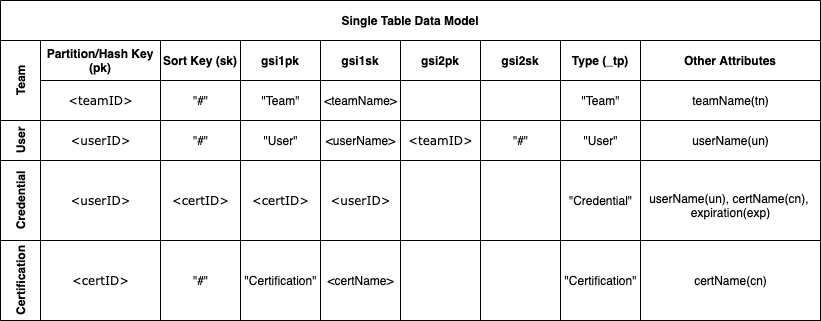
The primary key here is a composite of the partition/hash key (pk) and the sort key (sk). To retrieve an item in DynamoDB you must specify the partition key exactly and a range of sort key values. This allows you to retrieve more than one item if they share a partition key. The indexes here are shown as gsi1pk, gsi1sk, etc. These generic attribute names are used for for the indexes (i.e. gsi1pk) so that the same index can be used to access different types of items with different access pattern. With a composite key the sort key cannot be empty so the “#” is used as a placeholder when the sort key is not needed.
| Access Pattern | Query Conditions |
|---|---|
| Team, User, or Cert by ID | Primary Key, pk=ID,sk=“#” |
| Team, User, or Cert by name | Index GSI 1, gsi1pk=type, gsi1sk=name |
| All Teams, Users, or Certs | Index GSI 1, gsi1pk=type |
| All Users on a Team by ID | Index GSI 2, gsi2pk=teamID |
| All Certs for a User by ID | Primary Key, pk=userID, sk=certID |
| All Users with a Cert by ID | Index GSI 1, gsi1pk=certID, gsi1sk=userID |
Database schema
We enforce the “database schema” in the application. The DynamoDB API is powerful, but also verbose and complicated. Many people jump directly to using an ORM to simplify it. Here we will directly access the database using the helper functions below to create the schema for the a Team item.
const DB_MAP = {
  TEAM: {
    get: ({ teamId }) => ({
      pk: teamId,
      sk: '#',
    }),
    put: ({ teamId, teamName }) => ({
      pk: teamId,
      sk: '#',
      gsi1pk: 'Team',
      gsi1sk: teamName,
      _tp: 'Team',
      tn: teamName,
    }),
    parse: ({ pk, tn, _tp }) => {
      if ((_tp = 'Team')) {
        return {
          id: pk,
          name: tn,
        };
      } else return null;
    },
    queryByName: ({ teamName }) => ({
      IndexName: 'gsi1pk-gsi1sk-index',
      ExpressionAttributeNames: { '#p': 'gsi1pk', '#s': 'gsi1sk' },
      KeyConditionExpression: '#p = :p AND #s = :s',
      ExpressionAttributeValues: { ':p': 'Team', ':s': teamName },
      ScanIndexForward: true,
    }),
    queryAll: {
      IndexName: 'gsi1pk-gsi1sk-index',
      ExpressionAttributeNames: { '#p': 'gsi1pk' },
      KeyConditionExpression: '#p = :p ',
      ExpressionAttributeValues: { ':p': 'Team' },
      ScanIndexForward: true,
    },
  },
  parseList: (list, type) => {
    if (Array.isArray(list)) {
      return list.map(i => DB_MAP[type].parse(i));
    }
    if (Array.isArray(list.Items)) {
      return list.Items.map(i => DB_MAP[type].parse(i));
    }
  },
};
To put a new team item in the database you call DB_MAP.TEAM.put({teamId:"t001",teamName:"North Team"}). This forms the index and key values that are passed to the database API. The parse method takes an item from the database and translates it back to the application model.
GraphQL schema
Here is the GraphQL Schema.
type Team {
    id: ID!
    name: String
    members: [User]
}

type User {
    id: ID!
    name: String
    team: Team
    credentials: [Credential]
}

type Certification {
    id: ID!
    name: String
}

type Credential {
    id: ID!
    user: User
    certification: Certification
    expiration: String
}

type Query {
    team(id: ID!): Team
    teamByName(name: String!): [Team]
    user(id: ID!): User
    userByName(name: String!): [User]
    certification(id: ID!): Certification
    certificationByName(name: String!): [Certification]
    allTeams: [Team]
    allCertifications: [Certification]
    allUsers: [User]
}
Resolvers
Resolvers are where a GraphQL query is executed. You can get a long way in GraphQL without ever writing a resolver. But to bridge the gap between GraphQL and DynamoDB we need to write some resolvers. For each query in the schema above there is a root resolver below (only the team root resolvers are shown here). This root resolver returns either a promise or an object with part of the query results. If the query returns a Team type as the result then execution is passed down to the Team type resolver. That resolver has a function for each of the values in a Team. If there is no resolver for a given value (i.e. id) it will look to see if the root resolver already passed it down. A query takes four arguments. The first (called root or parent) is an object passed down from the resolver above. The second (called args) contains the arguments passed to the query. The third (called context) can contain anything the application needs to resolve the query. In this case the context has a reference to the database. The final argument (called info) is often not used. It includes more details about the query (including a full abstract syntax tree).
In the resolvers below ctx.db.singletable is the reference to the dynamoDB table that contains all the data. The get and query methods directly execute against the database and the DB_MAP.TEAM.... translates our schema to the database. The parse translates the data back to the from needed for the GraphQL schema.
const resolverMap = {
  Query: {
    team: (root, args, ctx, info) => {
      return ctx.db.singletable.get(DB_MAP.TEAM.get({ teamId: args.id })).then(data => DB_MAP.TEAM.parse(data));
    },
    teamByName: (root, args, ctx, info) => {
      return ctx.db.singletable
        .query(DB_MAP.TEAM.queryByName({ teamName: args.name }))
        .then(data => DB_MAP.parseList(data, 'TEAM'));
    },
    allTeams: (root, args, ctx, info) => {
      return ctx.db.singletable.query(DB_MAP.TEAM.queryAll).then(data => DB_MAP.parseList(data, 'TEAM'));
    },
  },
  Team: {
    name: (root, _, ctx) => {
      if (root.name) {
        return root.name;
      } else {
        return ctx.db.singletable.get(DB_MAP.TEAM.get({ teamId: root.id })).then(data => DB_MAP.TEAM.parse(data).name);
      }
    },
    members: (root, _, ctx) => {
      return ctx.db.singletable
        .query(DB_MAP.USER.queryByTeamId({ teamId: root.id }))
        .then(data => DB_MAP.parseList(data, 'USER'));
    },
  },
  User: {
    name: (root, _, ctx) => {
      if (root.name) {
        return root.name;
      } else {
        return ctx.db.singletable.get(DB_MAP.USER.get({ userId: root.id })).then(data => DB_MAP.USER.parse(data).name);
      }
    },
    credentials: (root, _, ctx) => {
      return ctx.db.singletable
        .query(DB_MAP.CREDENTIAL.queryByUserId({ userId: root.id }))
        .then(data => DB_MAP.parseList(data, 'CREDENTIAL'));
    },
  },
};
Now lets follow the execution of the query below. First the team root resolver reads the team by id and returns id and name. Then the Team type resolver reads all the members of that team. Then the User type resolver is called for each user to get all of their credentials and certifications. If there are five members on the team and each member has five credentials that results in a total of 7 reads for the database. You could argue that that is too many. In a SQL database this might be reduced to 4 database calls. I would argue that in many cases the 7 DynamoDB reads will be cheaper and faster than the 4 SQL reads. But this comes with a big dose of “it depends” on a lot of factors.
query { team( id:"T-001" ){
    id
    name
    members{
      id
      name
      credentials{
        id
        certification{
          id
          name
        }
      }
    }
    }
  }
}
Overfetching and N+1
Optimizing a GraphQL API involves balancing a whole lot of tradeoffs that we won’t get into here. But two that weigh heavily in the decision of DynamoDB vs. SQL are Overfetching and the N+1 problem. In many ways these are opposite sides of the same coin. Overfetching is when a resolver requests more data from the database than it needs to respond to the query. This often happens when you try to make one call to the database in the root resolver or a type resolver (i.e. members in the Team type resolver above) to get as much of the data as you can. If the query did not request the name attribute it can be seen as wasted effort.
The N+1 problem is almost the opposite. If all the reads are pushed down to the lowest level resolver then the team root resolver and the members resolver would make only a minimal or no request to the database. They would just pass the id’s down to the Team type and User type resolver. In this case instead of members making one call to get all five members it would push down to User to make five separate reads. This would result in potentially 36 or more separate reads. In practice this does not happen because the server would use something like the DataLoader library that acts as a middleware to intercept those 36 calls and batch them into probably only 4 calls to the database. These smaller atomic read requests are needed so that the DataLoader (or similar tool) can efficiently batch them into fewer reads.
So to optimize a GraphQL API with SQL it is usually best to have small resolvers at the lowest levels and use something like DataLoader to optimize them. But for a DynamoDB API it is better to have “smarter” resolvers higher up that match the access patterns your single table database it written for. The overfetching in this case is usually the lesser of the two evils.
Deploy this example in 60 seconds
This is where you realize the full payoff of using DynamoDB together with serverless GraphQL. I built this example with the Architect (arc.codes). It is open source and free, although it is the same tech that runs Begin.com which you should also check out. It is one of many options to build a whole app using serverless technology on AWS without most of the headaches of the AWS console. I think it is one of the best and it is the one I use. Take a look at this example on Github. Once you clone it and npm install you can launch it locally (with a local database with data built in) with a single command. Not only that you can also deploy it straight to production on AWS with a single command as well.